




WordPress > appearance > theme file editor is not found.
If you are a WordPress developer or a digital marketer, you may also face this problem.
Since I work with WordPress development and search engine optimization, I am sharing it with you. I am sure you will benefit.
Theme file editor is required to change some of the code, but WordPress > appearance > theme file editor is not found.
Let’s talk about the direct work
Login to the hosting site and open public_html > wp-config.php in the file manager and scroll down to find

These two lines. If it is set to true, then the theme file editor will be hidden, our job will be to make it false. By setting this to false, we will go to the WordPress dashboard and find WordPress > appearance > theme file editor and edit it.
Let’s see why it is DISALLOWed.
These two constants

Used for WordPress security and admin control.
Its function: Disables Theme Editor and Plugin Editor from the WordPress Dashboard.
If you set this constant to true,
define( ‘DISALLOW_FILE_EDIT’, true );
then Appearance → Theme File Editor and Plugins → Plugin File Editor — both will disappear from the Dashboard.
This is generally a security best practice, because if someone hacks the admin panel, they will not be able to edit the code directly.
DISALLOW_FILE_MODS
This is one step more powerful than DISALLOW_FILE_EDIT!
Its function:
Disables plugin/theme install, update, delete from WordPress.
WordPress core updates are also stopped.
define( ‘DISALLOW_FILE_MODS’, true );
This is used when we want no one to be able to modify anything from within WordPress (such as in a staging site or enterprise setup).
If we want to edit, we will set it to false.
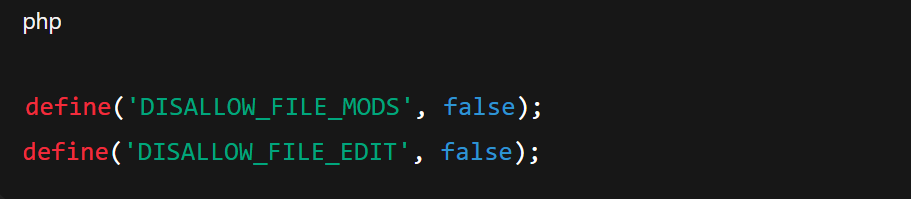
If set to false, you will be able to do file edit, plugin/theme install–update everything from the Dashboard
Some themes disallow file edit for security best practice.
Hello Elementor theme disallows file edit.
Urna theme does not disallow file edit.
Can you tell me which theme you are checking with?